数据库使用
在联犀中数据库的相关操作都放到了 share/stores 中 其中我们需要重点关注: share/stores/conn.go
初始化
- 在配置结构体中添加数据库定义
internal/config/config.goDatabase conf.Database示例:
package config

import (
	"gitee.com/unitedrhino/share/conf"
	"github.com/zeromicro/go-zero/core/stores/cache"
	"github.com/zeromicro/go-zero/rest"
)

type Config struct {
	rest.RestConf
	CacheRedis cache.ClusterConf
	Event      conf.EventConf     //和things内部交互的设置
	DmRpc      conf.RpcClientConf `json:",optional"`
	SysRpc     conf.RpcClientConf `json:",optional"`
	Database    conf.Database
}- 配置文件中添加配置,注意,修改为正确的账号密码及ip端口
Database:
  DBType: mysql
  DSN: root:password@tcp(127.0.0.1:3306)/iThings?charset=utf8mb4&collation=utf8mb4_bin&parseTime=true&loc=Asia%2FShanghai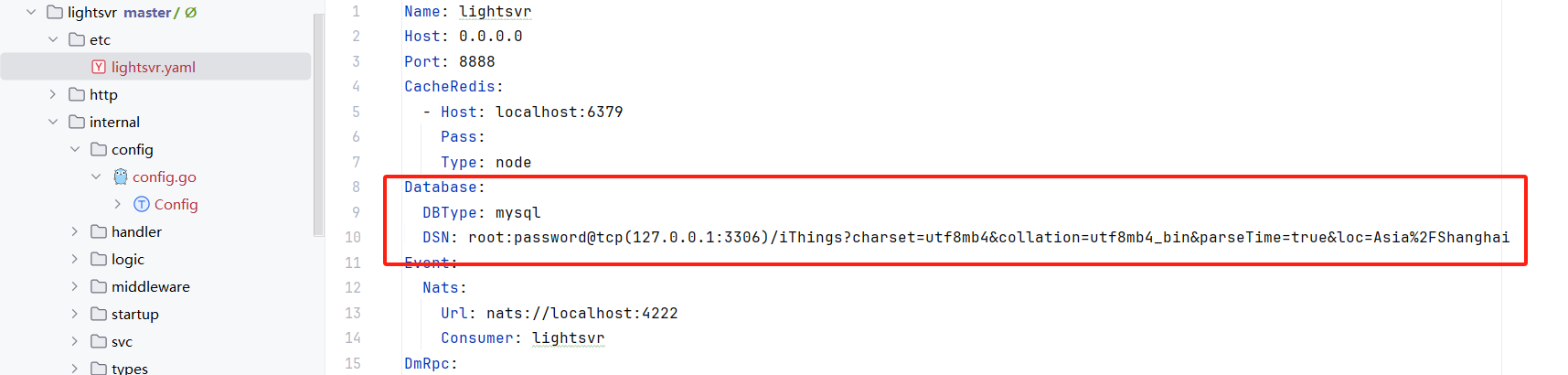
- 数据库连接初始化
在联犀中数据库连接由 stores包进行管理,位置在share/stores/conn.go
我们在业务的svc下的 serviceContext.go
在 NewServiceContext函数中添加
stores.InitConn(c.Database)即可初始化数据库连接
- 创建orm模型 在
internal/repo/relationDB/model.go中编辑好gorm的模型,如果没有这个文件创建对应的文件,如果是数据库表可以通过转换工具转换成go的结构体
创建的模型示例如下:
package relationDB

import (
	"gitee.com/unitedrhino/share/stores"
	"time"
)

type LightExample struct {
	ID int64 `gorm:"column:id;type:bigint;primary_key;AUTO_INCREMENT"` // id编号
}

// 设备信息表
type LightDeviceMsgCount struct {
	ID   int64             `gorm:"column:id;type:bigint;primary_key;AUTO_INCREMENT"`
	Num  int64             `gorm:"column:num;type:bigint;default:0"`                                  //数量
	Date time.Time         `gorm:"column:date;NOT NULL;uniqueIndex:date_type"`                        //统计的日期
	stores.OnlyTime
}

func (m *LightDeviceMsgCount) TableName() string {
	return "light_device_msg_count"
}
建议以服务名作为命名的前缀及表的前缀
引入操作模版(第一次需要) 将
things/service/dmsvr/internal/repo/relationDB/example.go复制到业务相同路径下, 然后将文件关键词替换 Dm -> 服务名(如light)编辑数据库操作函数 复制
example.go为deviceMsgCount.go
在deviceMsgCount.go中将 Example 替换为DeviceMsgCount
在todo中完善过滤条件即可在业务中使用
使用示例:
	//普通使用模式
	err := relationDB.NewDeviceMsgCountRepo(l.ctx).Insert(l.ctx, &relationDB.LightDeviceMsgCount{
		Num:  6,
		Date: time.Now(),
	})
	//事务示例
	err=stores.GetCommonConn(l.ctx).Transaction(func(tx *gorm.DB) error {
		//初始化的时候一定要传tx,如果传的是ctx,则不会在这个事务里
		po,err:=relationDB.NewDeviceMsgCountRepo(tx).FindOne(l.ctx,66)
		if err!=nil{
			return err
		}
		po.Num++
		return relationDB.NewDeviceMsgCountRepo(tx).Update(l.ctx,po)
	})
return err- 数据初始化 在
lightsvr/internal/repo/relationDB/modelMigrate.go创建对应的文件,文件内容如下:
package relationDB

import (
	"context"
	"gitee.com/unitedrhino/share/conf"
	"gitee.com/unitedrhino/share/stores"
)

func Migrate(c conf.Database) error {
	if c.IsInitTable == false {
		return nil
	}
	db := stores.GetCommonConn(context.TODO())
	err := db.AutoMigrate(
		&LightDeviceMsgCount{},//需要初始化的表放这里会自动处理
	)
	if err != nil {
		return err
	}
	return err
}然后在lightsvr/internal/svc/serviceContext.go 的 NewServiceContext中添加以下初始化函数
	err:=relationDB.Migrate(c.Database)
	logx.Must(err)
高级
分布式事务: share/stores/barrier/barrier.go 灵活查询: share/stores/cmp.go 时间类型: share/stores/time.go
联表查询(子查询过滤)
在需要根据关联表数据进行过滤时,应使用 GORM 的子查询方式,而不是直接拼接 SQL 字符串。
参考示例:backend/things/service/dmsvr/internal/repo/relationDB/deviceInfo.go:248~367
实现方法
假设需要根据租户应用绑定表 sys_tenant_app 过滤应用列表:
// 1. 创建子查询
subQuery := p.db.Model(&SysTenantApp{}).Select("app_id")

// 2. 使用子查询进行过滤
if f.WithTenantIsBind == 1 {
    // 只返回已绑定的应用
    db = db.Where("id IN (?)", subQuery)
} else if f.WithTenantIsBind == 2 {
    // 只返回未绑定的应用
    db = db.Where("id NOT IN (?)", subQuery)
}
重要说明
自动租户过滤:如果模型中的字段(如
TenantCode)已实现自动过滤,则无需在子查询中手动添加租户过滤条件。GORM 会根据上下文自动处理。避免手动 SQL 拼接:不要使用字符串拼接方式:
// ❌ 错误示例 - 不要这样做 db = db.Where("id IN (SELECT app_id FROM sys_tenant_app WHERE tenant_code = ?)", tenantCode) // ✅ 正确示例 - 使用子查询 subQuery := p.db.Model(&SysTenantApp{}).Select("app_id") db = db.Where("id IN (?)", subQuery)复杂子查询:对于更复杂的场景,可参考
deviceInfo.go中的实现,支持:- 多条件子查询组合
- INTERSECT 交集查询
- 多字段联合过滤
(product_id, device_name) IN (?)
完整示例
以应用信息查询为例(backend/core/service/syssvr/internal/repo/relationDB/appInfo.go):
Filter 定义:
type AppInfoFilter struct {
    TenantCode       string
    ID               int64
    IDs              []int64
    WithTenantIsBind int64 // 过滤租户是否已绑定的应用 1-是 2-否
}过滤实现:
func (p AppInfoRepo) fmtFilter(ctx context.Context, f AppInfoFilter) *gorm.DB {
    db := p.db.WithContext(ctx)

    // ... 其他过滤条件 ...

    // 过滤租户是否已绑定的应用
    if f.WithTenantIsBind != 0 {
        // 注意:SysTenantApp 模型中的 TenantCode 字段已实现自动过滤,无需手动添加 tenant_code 条件
        subQuery := p.db.Model(&SysTenantApp{}).Select("app_id")
        if f.WithTenantIsBind == 1 {
            // 只返回已绑定的应用:应用ID存在于 sys_tenant_app 表中
            db = db.Where("id IN (?)", subQuery)
        } else if f.WithTenantIsBind == 2 {
            // 只返回未绑定的应用:应用ID不存在于 sys_tenant_app 表中
            db = db.Where("id NOT IN (?)", subQuery)
        }
    }

    return db
}
API 到 Repo 的完整流程:
- API 定义 (
backend/core/service/apisvr/http/system/app/info.api):
AppInfoIndexReq {
    WithTenantIsBind int64 `json:"withTenantIsBind,optional"` // 1-是 2-否
}- Proto 定义 (
backend/core/service/syssvr/proto/app.proto):
message AppInfoIndexReq {
    int64 withTenantIsBind = 28; // 过滤租户是否已绑定的应用
}- RPC Logic 层 (
backend/core/service/syssvr/internal/logic/appmanage/appInfoIndexLogic.go):
func (l *AppInfoIndexLogic) AppInfoIndex(in *sys.AppInfoIndexReq) (*sys.AppInfoIndexResp, error) {
    f := relationDB.AppInfoFilter{
        WithTenantIsBind: in.WithTenantIsBind,
        // ... 其他字段 ...
    }
    ret, err := relationDB.NewAppInfoRepo(l.ctx).FindByFilter(l.ctx, f, page)
    // ... 处理结果 ...
}- Repo 层:见上面的
fmtFilter实现
代码生成注意事项
修改 proto 文件后,使用 build.sh 脚本重新生成代码:
# 生成 RPC proto 代码
cd backend/core/service/syssvr
bash build.sh

# 生成 API 代码
cd backend/core/service/apisvr
bash build.sh
更新日志
2026/1/20 22:12
查看所有更新日志
8d8de-于d4fa0-于4066c-于d6975-于